 Tetgame
Help and Instructions for: TRIGAME
While playing can begin immediately for anyone anytime...
folks can also first stop into our Green Room to chat with others or enter games with others.
Members can also create tournaments there; selecting to allow any to participate, or just members, or particular players to join. Rankings between members are also posted there for top ranked members. If not logged in as a member (optional of course) folks are assigned a guest number. And there's more too, so feel free to stop in at our Green Room anytime.
The Board.
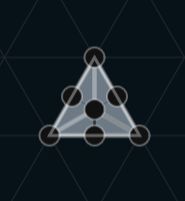
The board, or playing field, is dark, with light guide lines showing the triangular position of the tile to be placed there.
Center gray tile.
At the center of the board is a ghosted gray tile. This marks the starting position of the game, and the first tile must be placed on it.
Shown below on the left is a typical tile.
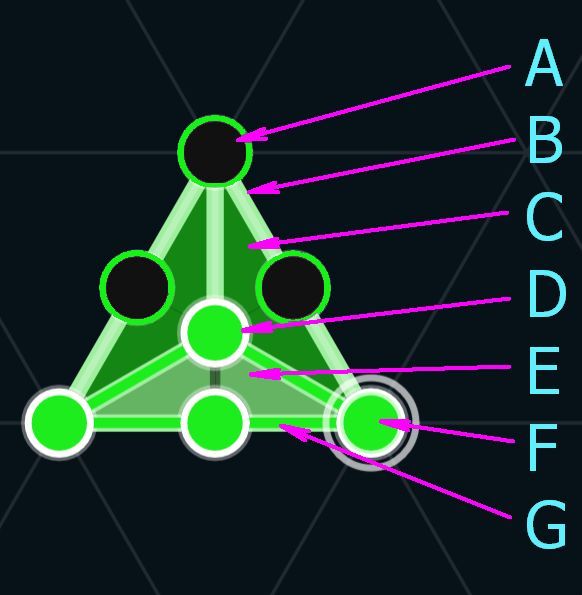
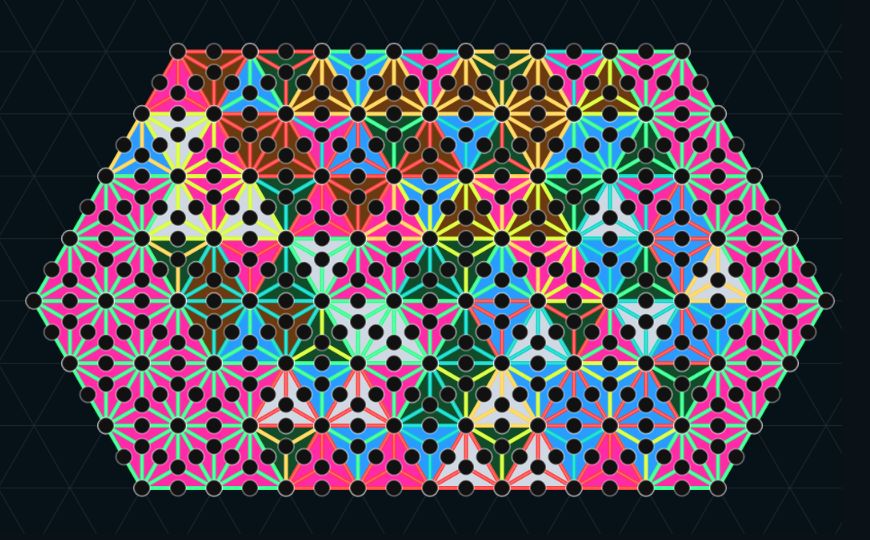
Tiles include the following features:
- Socket, unclaimed
- Path, unclaimed
- Partial territory, unclaimed
- Socket claimed by a token
- Partial territory, claimed
- Socket circled to show correct token placement
- Path, claimed
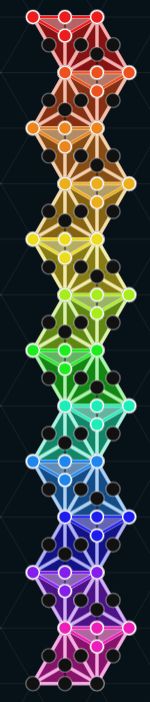
Colors for players' tiles and tokens.
Players are assigned colors in the order of entering the game to play. Tiles are initially two colors based on the players' set of colors below. Colors change to indicate who has placed a token on the socket, claimed a path between tokens, or captured a partial tile or whole tile by having tokens all around it and in the center in the case of a full tile.| Player # |
Token Owned Path |
Unowned Path |
Unowned Territory |
Owned Territory |
|---|---|---|---|---|
| 1. Red | |
|
|
|
| 2. Blue | |
|
|
|
| 3. Yellow | |
|
|
|
| 4. Orange | |
|
|
|
| 5. Green | |
|
|
|
| 6. Violet | |
|
|
|
| 7. Red-Orange | |
|
|
|
| 8. Yellow-Green | |
|
|
|
| 9. Blue-Green | |
|
|
|
| 10. Blue-Violet | |
|
|
|
| 11. Red-Violet | |
|
|
|
| 12. Yellow-Orange | |
|
|
|
Controls
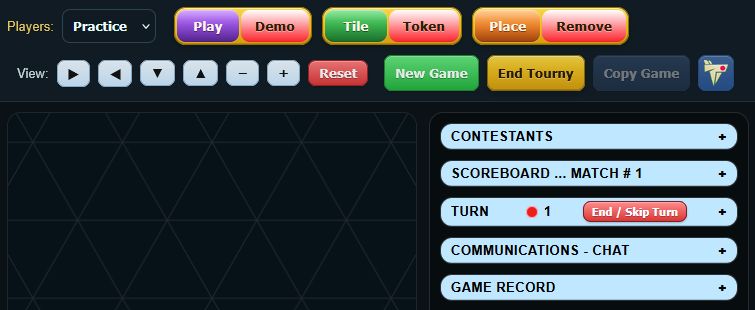
The top control panel allows selection of the players, mode, action, and sizing or moving the field of play, and is above the playing field and information panel to the right.
The panel to the right of the playing field has collapsible sections, which are expanded or collapsed by clicking on them
Top Control Bar

(Select) Players
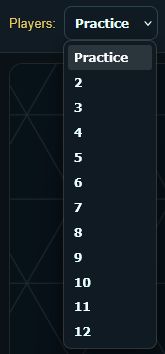
- Selecting PRACTICE allows you to explore the game.
It assumes there are 12 players and automatically advances you to play for the next player after each turn.
Everything else functions as if there were multiple folks playing.
...You just happen to be playing for all of them. -
Selecting 2-12 determines the number of players in the game.
Members of Rusty Rabbit's fluffle above can be included too.
GAME MODE: Play or Demo?


- Play mode is the normal mode to participate in the game as a player.
-
Demo mode allows the game to run in a completely automatic way between selected players of the fluffle.
A great way to get the feel of how games are played and progress through games and tournaments.
GAME PIECES: Tiles or Tokens?


-
Selecting Tiles allows placement of game tiles (triangles)on the board
The starting tile of the game must be placed over the gray center tile.
Tiles must be placed next to other tiles without any tokens on their adjacent edges.
Align the tile where desired and click to place it. -
Tokens may be placed on any empty socket.
One point is awarded for placing each token.
Align the token over the desired socket and click.
ACTION: Place or Remove?


- Select Place to place tiles and tokens on the board.
- Select Remove to remove unoccupied tile or tokens not part of occupied paths.

-
Remove is disabled for the second event or when board is locked.
Controlling the View of the Board

- Click the ▶ right arrow to move the pieces on the board to the right.
- Click the ◀ left arrow to move the pieces on the board to the left.
- Click the ▲ up arrow to move the pieces on the the pieces up.
- Click the ▼ down arrow to move the pieces on the board down.
- Click the minus sign ( - ) to shrink the board.
- Click the plus sign ( + ) to enlarge the board.
- Click the Reset button to return the board to its original size.
Additional controls.
- Next Match: Starts the next match in the same tournament with the same players.
-
End Game: Ends the current tournament or series of games and provides grand totals.

- Game Concluded: End of a 12-match tournament or game.
- Copy Game: This copies the text of the Game Record (lower right side panel) to the player's computer clipboard.
- Help Click the blue Trigame logo to open the Trigame instruction and help page.
- Green Room Click the green Trigame logo to open the Green Room.

Information Console | Contestants ⬤ Scoreboard ⬤ Turn ⬤ Communications - Chat ⬤ Game Record |
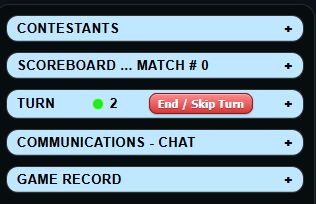
To the right of the game board is the collapsible Information Console panel with five sections.
Clicking on the light blue headers will expand or collapse the sections.
CONTESTANTS (Players)
Here you can enter the names of players or select players from our fluffle.SCOREBOARD
This section contains current scoring information on all playersTURN
Active information is displayed here on the current player and eventsCOMMUNICATIONS PORT - CHAT
Active information is displayed here on the current player and eventsGAME RECORD
This section records a log of the game moves and final scoring results.
CONTESTANTS & Players
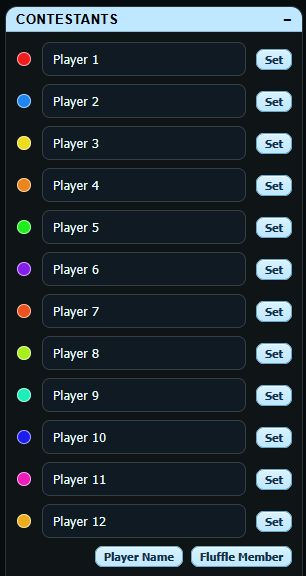
At the start of the game, the number of players should be selected from the top control bar.
Up to 12 players may play at one time, and are shown in the player section.
Each is assigned a default name and color in order.
Names of human players can be changed at any time.
Players can also be changed at any time.
Trigame is designed with the flexibility to allow both human and AI players.

Rusty Rabbit is our AI co-developer and has provided his fluffle of relatives as AI players.
Meet Rusty's fluffle of relatives:
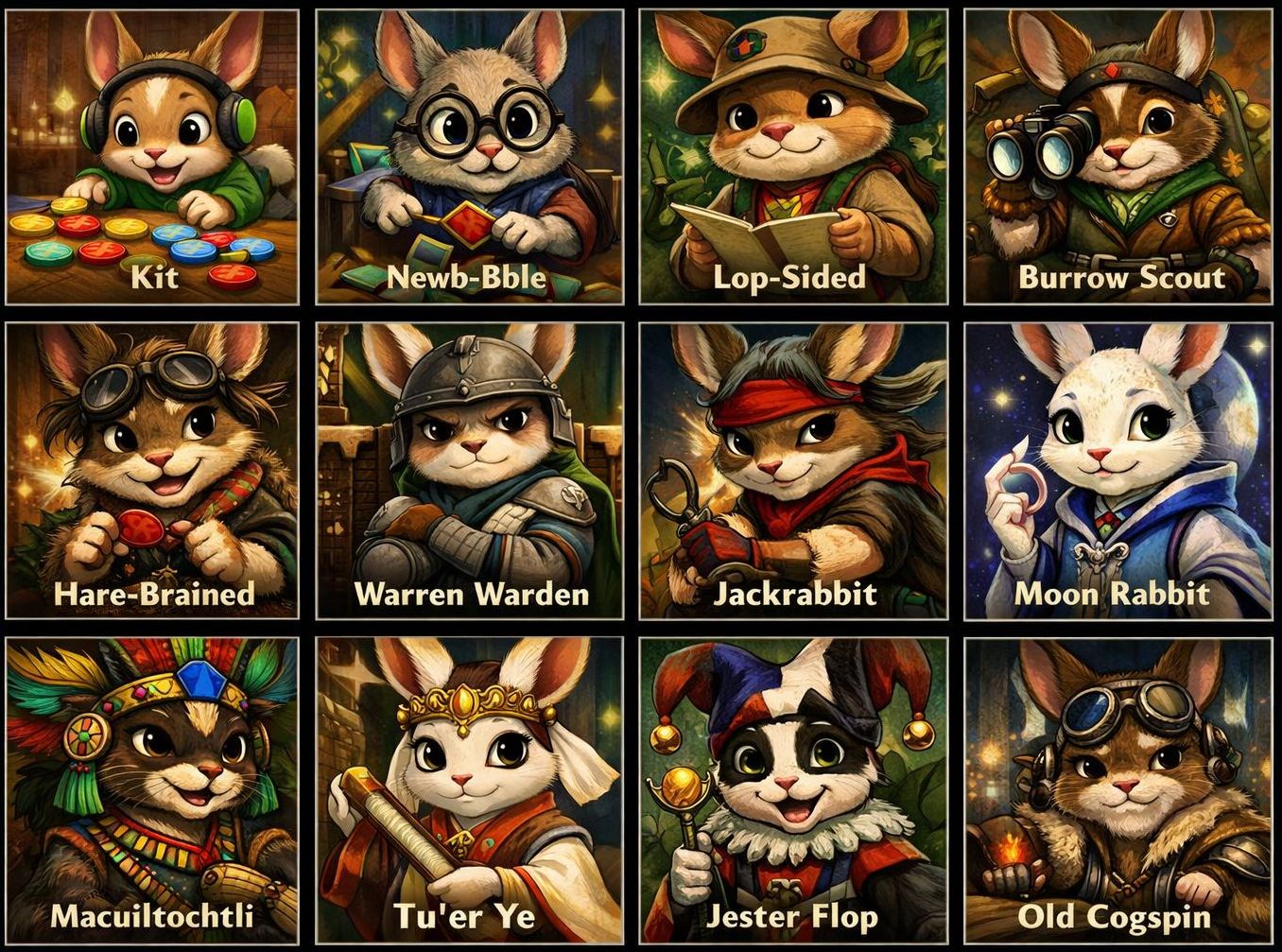 Kit
Kit
Our baby bunny who makes almost random moves, and just loves those colorful dots!
Newb-Bble
Who is older and notices immediate sub-tile gains... sometimes.
Lop-Sided
Who prefers local clusters, but has a weak shape sense.
Burrow Scout
Who seems to notice expansion lanes better.
Hare-Brained
Who is opportunistic, tactical, but a bit inconsistent.
Warren Warden
Who starts defending and denying well compared to the previous rabbits here.
Jackrabbit
Who is a fast tactical hunter and senses strong immediate sequences.
Moon Rabbit
Who is more positional and values shape and branching.
Macuiltochtli
Who is dangerous, weird, disruptive, with a strong denial play style.
Tuer Ye
Who is cold, maximizing, deep-searching, and plays a ruthless endgame.
Jester-Flop
Who cheats, capers, and laughs it off when caught. (Currently banned from playing.)
Old Cogspin
Who modifies the machinery, reinterprets the rules, and wins by technicality. (Also currently banned from playing.)
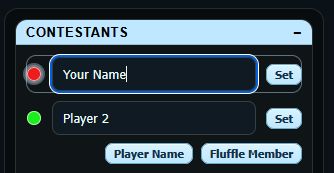
Changing names and players:
Players may enter their name to replace the default of just a player number.
- Click the colored dot or field to change.
- Click the player name button
 at the bottom of the list.
- Type in the new name.
- Click the set
 button .
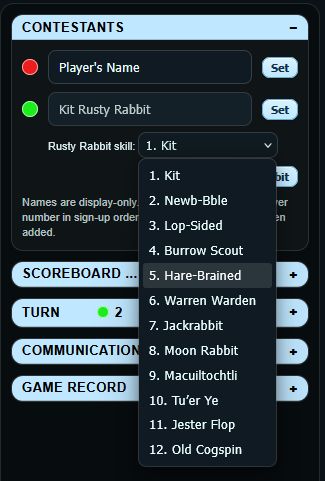
To add a member of the fluffle:
- Click the desired player field for the new player.
- Click the Fluffle Member
 button.
- Select member from the dropdown list.
- Click the set button .
Warning: Rusty Rabbit has banned both Jester-Flop and Old Cogspin from their regular family tournaments for cheating. You would be wise to do the same. Jester-Flop is a magician and a joker, while Old Cogspin is a ruthless and highly intelligent hacker.
Rusty Rabbit is our AI co-developer and has provided his fluffle of relatives as AI players.
Meet Rusty's fluffle of relatives:
KitOur baby bunny who makes almost random moves, and just loves those colorful dots!
Newb-Bble
Who is older and notices immediate sub-tile gains... sometimes.
Lop-Sided
Who prefers local clusters, but has a weak shape sense.
Burrow Scout
Who seems to notice expansion lanes better.
Hare-Brained
Who is opportunistic, tactical, but a bit inconsistent.
Warren Warden
Who starts defending and denying well compared to the previous rabbits here.
Jackrabbit
Who is a fast tactical hunter and senses strong immediate sequences.
Moon Rabbit
Who is more positional and values shape and branching.
Macuiltochtli
Who is dangerous, weird, disruptive, with a strong denial play style.
Tuer Ye
Who is cold, maximizing, deep-searching, and plays a ruthless endgame.
Jester-Flop
Who cheats, capers, and laughs it off when caught. (Currently banned from playing.)
Old Cogspin
Who modifies the machinery, reinterprets the rules, and wins by technicality. (Also currently banned from playing.)
Changing names and players:
Players may enter their name to replace the default of just a player number.
- Click the colored dot or field to change.
- Click the player name button at the bottom of the list.
- Type in the new name.
- Click the set button .
|
|
To add a member of the fluffle:
|
SCOREBOARD.
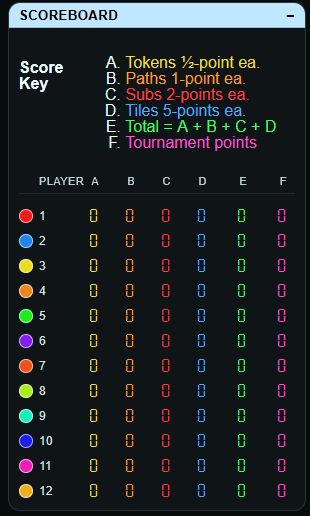
Points Awarded:
Ties divide the tournament points as follows:
¾⅔½ ⅓ ¼ ⅛. |
½ Point
|
1 Point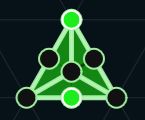
|
1½ Points 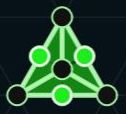
|
2 Points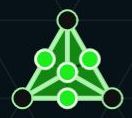
|
|
2 Points
|
3½ Points
|
|
5½ Points
|
7½ Points 
|
|
8 Points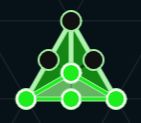
|
9 points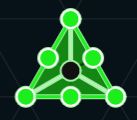
|
|
14 Points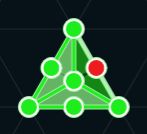
|
22½ Points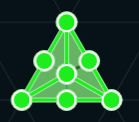
|
|
TURN.
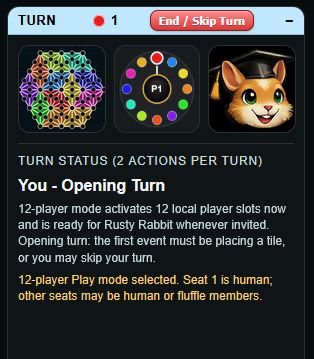
The Turn panel shows whose turn it is to play, along with the current action count for that turn.
Each player normally has two actions per turn. These actions may be used to place or remove tiles and tokens, according to the current mode and the rules of play.
At the top of the panel is a colored dot and player number. This shows the current player.
The circular display below it gives a quick visual reference for the players in the game and helps show whose turn is active.
To the left and right of the turn indicator are images of player and fluffle contestants.
Beneath that, the Turn Status area gives a written description of the current turn, including which action is being taken, how many actions remain, and any game message or reminder that may be helpful.
The End / Skip Turn  button may be used to end the current player's turn before both actions are used.
In some versions of the game, this panel may also be used for special notices, automatic messages from Rusty Rabbit, or information about demo and multi-player modes.
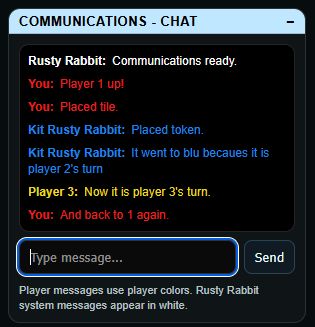
COMMUNICATIONS - CHAT.
The Communications - Chat panel provides a place for player messages and game notices.
Messages entered here appear in the black message window above the entry box.
For now, a typed message is shown in the color of the current player. This helps match the message to the player whose turn it is.
Messages from Rusty Rabbit, such as system notices or helper comments, appear in white.
The text field at the bottom is used to enter a message. Press Send, or press Enter, to post it.
At present, this panel is mainly a local feature for testing and for preparing future multi-player versions of the game.
In later online versions, this same area may be used for live player chat, turn announcements, invitations, and other game-related communication.
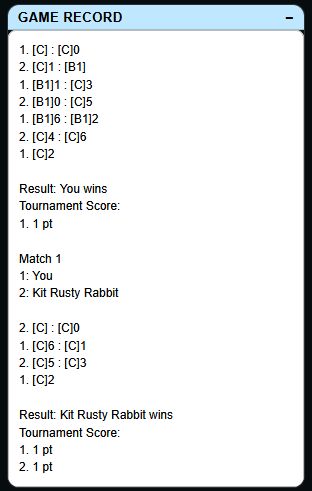 GAME RECORD
Not needed in the slightest to play the game, the development process was aided by the creation of a system of recording and tracking events. This has helped in fine tuning the personalities of the fluffle. It was interesting enough as a feature to have been left in. At game's end it can be copied to your computer's clipboard and pasted to a text file for reference or sharing or just to document your games.
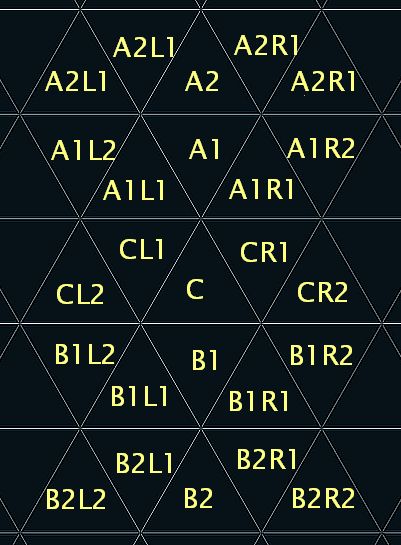
Trigame can be described in a compact symbolic form so a full game may be copied, saved, or shared as plain text.
-
Tile location:
A tile is written inside square brackets.
Example:[C]means the center tile.
[A1]means the tile one row above center.
[B1]means the tile one row below center.
[CL1]means the tile one position left of center.
[CR1]means the tile one position right of center. -
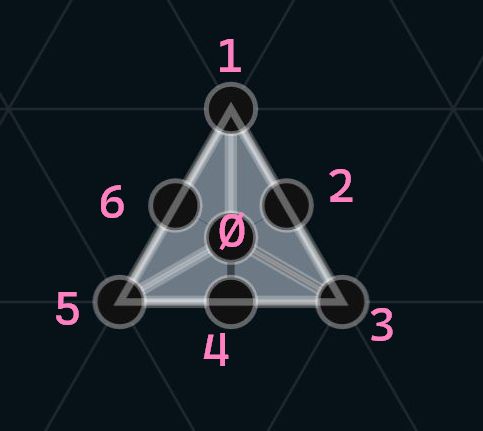
Socket number:
Add a number after the tile reference to indicate a socket on that tile.
0is the center socket.
1through6count clockwise around the tile.
Example:[C]3 -
Tile placement:
A tile placement is written as the tile reference only.
Example:[A1] -
Token placement:
A token placement is written as the tile reference followed by the socket number.
Example:[C]0or[A1]5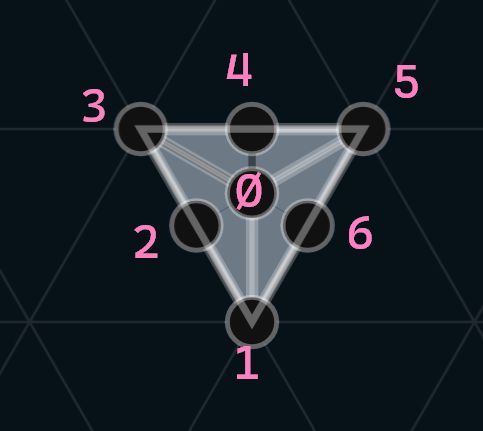
-
Erasing:
A minus sign before the move means that token is erased.
Example:-[C]0 -
Multiple actions:
Actions within one turn are separated by a colon.
Example:[A1] : [A1]0 -
Per-player record:
Each move line begins with the player number.
Example:1. [C] : [C]0
A further note on tokens:
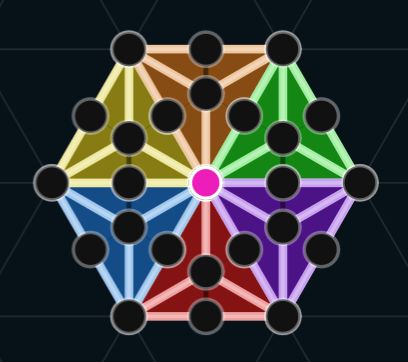 It simply does not matter which tile is used in referencing a token.
Note the picture to the right:
The red token in the center is common to six different tiles.
Any may be used as a reference for it, and all may be said to be pointing either up or down.
Starting with the point as 1, count clockwise until you get to the red token, and that is its number when referenced by that tile.
For the green tile it would be 5, but for the purple tile it would be 3 and it would be 4 again if referring to the blue tile.
Examples
1. [C] : [C]0
2. [C]5 : [C]4
4. -[C]0 : [C]0
This notation makes it possible to copy and save a game record as text, then later replay or analyze the moves.
Also, as we have some such as Jester-Flop and Old Cogspin who don't play fair: There is an additional button called Audit to catch them red handed in the act and notate it in the Game Record. It may be turned on by clicking this audit button on the Game Record header:  .
.
Order of Play and Procedures:
A player's turn normally allows two actions .
Bonus actions may also be awarded.
Possible actions include the following:
- Place a tile on the board.
A tile may not be placed against an edge with a token on it. - Place a token on the board.
They are placed only on empty sockets. - Remove a tile from the board.
A tile may not be removed if it has a token on it. - Remove a token from the board.
Tokens must be isolated and not connected by an occupied path. - Skip the turn to the next player.
(Only allowed once per game or match.)
First turn of the game (first player only):
First action of the first turn of the game: A player must do one of the following:
- Place a tile on the board.
- Skip the turn to the next player.
Second action of the first turn of the game: A player may do one of the following:
- Place a tile on the board.
- Place a token on the board.
- Skip the turn to the next player.
Normal play:
First action of each player's turn: A player may do any of the following:
- Place a tile on the board.
- Place a token on the board.
- Remove a tile from the board.
- Remove a token from the board.
- Skip the turn to the next player.
Second action of each player's turn: A player may do any of the following:
- Place a tile on the board.
- Place a token on the board.
- Skip the turn to the next player.
Bonus action:
A bonus action results from capturing a tile.
...Having tokens on every socket of the tile:
- Place a token on the board.
- Skip the turn to the next player.
Locked board:
- The board is said to be locked when no more tiles can be placed.
- Tiles and tokens may not be removed when the board is locked.
Additional notes:
- After the first tile has been placed, all new tiles must be placed edge to edge with an existing tile.
- Trigame automatically assumes tournament play, consisting of multiple matches or games.
- End Tourny ends a series of matches or games, ending the tournament.
TRIGAME SOUND REFERENCE LIST - click an item to hear the sound associated with the event.
NEW UI / TOURNAMENT EVENTS
CORE TURN / STATE EVENTS
TILE PLACEMENT EVENTS
TILE ERASE EVENTS
|
TOKEN PLACEMENT EVENTS
TOKEN ERASE EVENTS
BOARD PROGRESSION / CAPTURE EVENTS
ENDGAME / LOCK-STATE EVENTS
TOOLBAR / MODE / CONTROL EVENTS
SPECTATOR SOUNDS
|
VIEW NAVIGATION EVENTS
HOVER TARGETING EVENTS
TURN-STATUS TEXT / MESSAGE EVENTS
|
Game Vocabulary.
- Action - one of the two allowed steps within a turn.
Current terms in use: action, event. - Board locked - the state in which no more tiles can be placed.
Current terms in use: board locked, locked board, locked. - Contestants - section-heading term for the player list area.
Current terms in use: contestants, players. - Copy Game - button label for copying the Game Record to the clipboard.
Current terms in use: Copy Game, copy game record. - Demo - automatic play mode for watching games run on their own.
Current terms in use: Demo, DEMO, automatic way. - Edge-to-edge - the required tile contact for normal placement after the first tile.
Current terms in use: edge to edge, edge-to-edge, touching edge. - Full tile - a tile fully captured by having tokens on every socket of that tile.
Current terms in use: full tile, full territory tile, capturing a tile. - Game over - the end-of-game state when no legal actions remain.
Current terms in use: game over. - Game Record - the running written log of play and results.
Current terms in use: Game Record, record, game record text. - Gray start triangle - the required starting location for the first tile of the game.
Current terms in use: gray start triangle, center gray tile, ghosted gray tile, starting position. - Match - one completed game within a tournament sequence.
Current terms in use: match, game. - New Game - button label for beginning another game with the same players.
Current terms in use: New Game, new game. - Overlaps - the setting or behavior allowing tile overlap placement.
Current terms in use: overlaps, overlap mode. - Path - a connected run between sockets that may become owned and scored.
Current terms in use: path, captured path, owned path, unowned path. - Place - the action of adding a tile or token to the board.
Current terms in use: Place, place. - Players - general term for the participants in a game.
Current terms in use: players, player, contestants. - Play - normal interactive play mode.
Current terms in use: Play, PLAY, normal mode. - Rabbots - automated players, including Rusty's fluffle and other AI contestants.
Current terms in use: Rabbots, AI players, fluffle members. - Remove - button label and action for taking tiles or tokens off the board when legal.
Current terms in use: Remove, remove, tile erase, token erase, erased, erasing. - Reset - button label for returning the board view to its original size and position.
Current terms in use: Reset, reset view, keyboard reset. - Scoreboard - the right-side panel section showing current points and totals.
Current terms in use: Scoreboard, scoring. - Seats - positions or player slots in a game.
Current terms in use: seats, player positions, slots. - Socket - a token position on a tile.
Current terms in use: socket, empty socket, occupied socket, target socket. - Sub-territory - one of the smaller scored regions on a tile.
Current terms in use: sub-territory, sub-tile. - Tile - the triangular board piece placed on the playing field.
Current terms in use: tile, tiles, triangle, board piece. - Token - the marker placed on a socket to claim space, paths, and territory.
Current terms in use: token, tokens, marker. - Tournament - a running series of matches or games with ongoing totals.
Current terms in use: tournament, series of games, series of matches. - Tournament Score - the running score across matches in a tournament.
Current terms in use: Tournament Score, Tournament Match Points, grand totals. - Turn - one player's chance to act, normally containing two actions.
Current terms in use: turn, Turn Status, skip turn, End / Skip Turn.
Quick Start.  -PLAY
-PLAY
In a hurry? Don't like to read instructions?
Not a problem. We get that, and this game is built to learn by exploring..
If you get stuck, simply refresh your browser and begin again.
We suggest three stages to learn quickly.
- Run in DEMO mode and just watch for a while.
- Select 2 - 12 Players (at the upper left):
 ←
←
- Click DEMO (at the upper left): ←
- Click NEXT MATCH (at the upper right: )

- Click NEXT MATCH again to continue a tournament of games / matches.
- Run in the PRACTICE mode without any opponents.
- Select PRACTICE (far upper left 'Players' dropdown menu)

- Click PLAY: →
- Move your tile to the gray triangle and click to place a tile there.
- Continue placing more and more, building outward.
You are playing for all 12 players.
Every two events, the tile changes to the next player's color.
- Click TOKEN to switch to placing tokens instead.←
Click, click, click, place them to get a feel for the result.
Click two next to each other and see the path between them change color.
If the color is right, clicking two will also add more in a straight line between them.
- Click REMOVE to switch to removing tiles or tokens instead: ←
- Run in DEMO mode and just watch for a while.
- Select 2 - 12 Players (at the upper left): ←
- Click DEMO (at the upper left): ←
- Click NEXT MATCH (at the upper right: )
- Click NEXT MATCH again to continue a tournament of games / matches.
- Select 2 - 12 Players (at the upper left):
- Run in the PRACTICE mode without any opponents.
- Select PRACTICE (far upper left 'Players' dropdown menu)
- Click PLAY: →
- Move your tile to the gray triangle and click to place a tile there.
- Continue placing more and more, building outward.
You are playing for all 12 players.
Every two events, the tile changes to the next player's color.
- Select PRACTICE (far upper left 'Players' dropdown menu)
- Click TOKEN to switch to placing tokens instead.←
Click, click, click, place them to get a feel for the result.
Click two next to each other and see the path between them change color.
If the color is right, clicking two will also add more in a straight line between them. - Click REMOVE to switch to removing tiles or tokens instead: ←
- Select 2 players: (at the upper left.)
- Click PLAY: →
- Place your first tile as the first player.
- Or choose to SKIP the TURN:
 ←
← - Proceed with playing after that.